



01
What the Coldbet App Is
The Coldbet app is one of several versions of the same platform, which is built on BetB2B. The company behind it is Game2Net B.V., with licences listed for Curaçao (OGL/2024/296/1093) and Anjouan. The digits in the Curaçao licence number are reproduced as published, not presented as a date. The app and web version use the same account, so the balance, bet history and settings remain associated with that account whichever version you use.
| Item | Value | Source |
|---|---|---|
| Owner | Game2Net B.V. | According to the operator |
| Licences | Curaçao (OGL/2024/296/1093), Anjouan | According to the operator |
| Platform | BetB2B | According to the operator |
| Interface languages | 65 | According to the operator |
| Currencies | 109, including EUR | According to the operator |
| Price | Free | According to the operator |
The table above summarises the platform details available in the published material. It does not provide a version number, update date or checksum. The listed languages and currencies indicate that the platform serves multiple markets. For players, the practical point is simpler: the same account, balance and games are available whichever of the 65 listed interface languages they choose.
02
Which Version Fits Your Phone
Picking a route starts with the phone in your hand, not with a recommendation from someone else's setup.

| Device | Route | Where to read more |
|---|---|---|
| Android phone | Coldbet apk | APK page |
| iPhone | TestFlight (test build) | Download page |
| iPhone | PWA added from Safari | Download page |
| Computer | QR code for PC | Download page |
On Android, the Coldbet app is installed from an APK file rather than through an app-store listing. The file, its size and its permissions are covered in the APK guide. iPhone users have two options: a test build distributed through Apple TestFlight or a PWA added from Safari. Both provide access to the same account, but neither is a conventional App Store release. If you start on a desktop or laptop, the page displays a QR code that you can scan with your phone to continue. The download guide explains the available routes in more detail.

Tool
Which version is for me
TipChoose the route by your phone model, not by what a friend uses.
03
Android or iPhone: What Really Changes
The Coldbet app for android installs as a direct file, which is really the one difference worth knowing before you start comparing the two platforms side by side.
- Android — the APK file is installed manually, through a file manager rather than a store; exact system requirements live on the APK page, so the figures aren't repeated here
- iPhone — a TestFlight test build or a PWA icon added from Safari; neither is listed in the App Store as a normal release, and neither requires the APK file at all
Neither platform is framed as better or worse here, just different in how the file or the icon reaches the phone in the first place. One is a single file you install yourself; the other runs through Apple's own testing channel or a browser shortcut, with no file to manage at all. For step-by-step instructions on both platforms, see the ColdBet download guide. It walks through the screens from the first tap to the completed installation.
This same Coldbet mobile app, regardless of platform, keeps the account and balance identical once logged in, so switching phones later doesn't mean starting over.
04
Logging In to the Coldbet App
Once the Coldbet app login screen opens for the first time after installation, the account itself works the same way as on the website.

- Open the app after installation
- Log in with an existing account, or register a new one
This page does not detail every sign-in method or the account-recovery process. In general, you can use the same credentials as on the website; a separate account is not needed for the app. If you have trouble signing in, the operator lists live chat as available 24/7. The screenshot below shows the account menu on the mobile website, not inside the app.
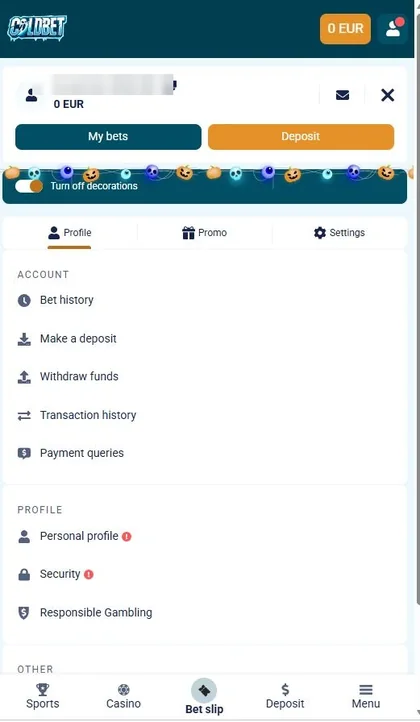
- 1Account menu (mobile version of the website, not the app)
TipKeep your account details at hand before you install.
05
Inside the Mobile Version: Menu, Casino Lobby and Account
These three screenshots come from the mobile version of the website, not from the Coldbet mobile app itself, and only describe what's visible in them. Coldbet mobile carries a bottom menu with five tabs, reachable at any point while browsing without opening a separate screen. The navigation menu holds buttons for "Download mobile app," shown for both Android and App Store, plus a Live consultant entry — note that "App Store" here names a button on the page, not a claim about an actual App Store release of the app. The third screenshot shows the casino lobby as it appears on Coldbet mobile, with no claim made here about whether the Coldbet app itself looks identical on screen once installed. A Coldbet mobile session and an app session share the same account behind the scenes either way.
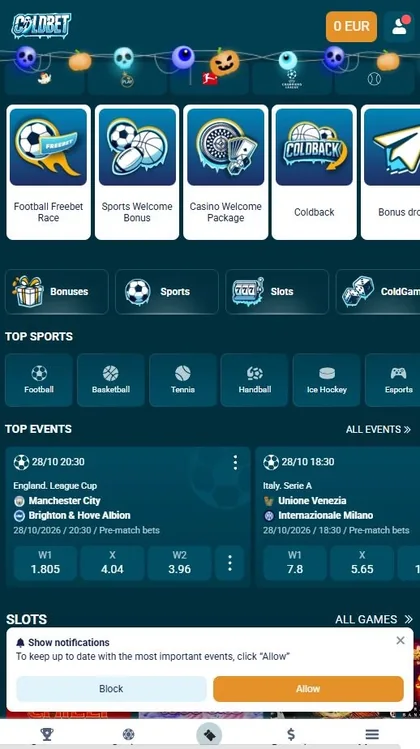
- 1Bottom menu with five tabs (mobile version of the website, not the app)
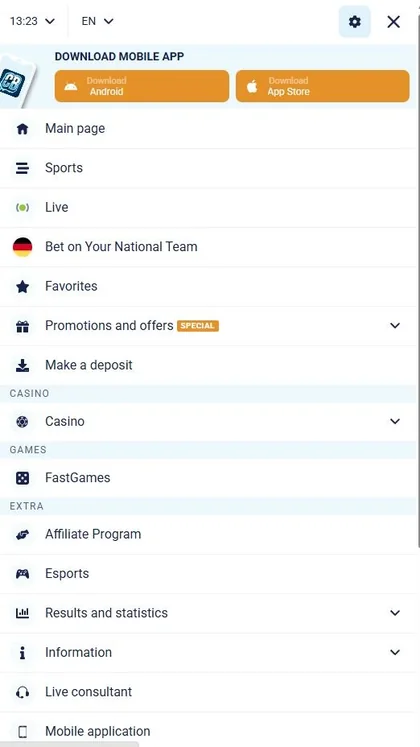
- 2Download mobile app, Android (mobile version of the website, not the app)
- 3Download mobile app, App Store (mobile version of the website, not the app)
- 4Live consultant (mobile version of the website, not the app)
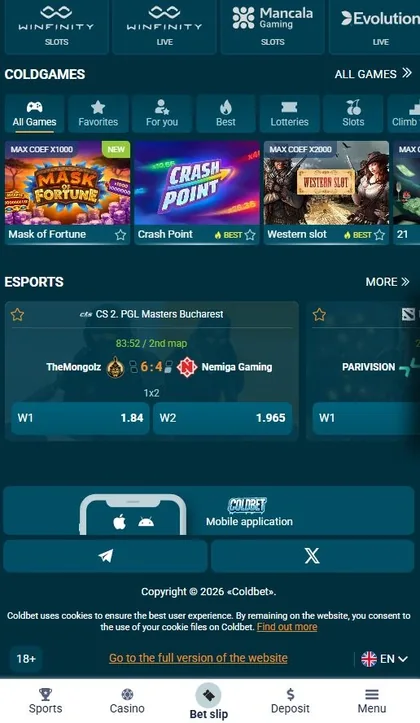
- 5Casino lobby (mobile version of the website, not the app)
TipOn the mobile website the download buttons are collected in the menu.
06
The Operator's App Versus Third-Party Builds
The term "Coldbet official app" refers here to the app distributed by the operator. The mobile website provides access through the "Download mobile app" button in its menu; this guide does not recommend third-party builds found elsewhere. Before installing a file, check its source and requested permissions. The Coldbet APK guide explains how to do that.

07
App, Mobile Site or PWA: A Quick Comparison
Three ways exist to reach Coldbet on a phone, and each behaves a little differently once it's actually installed and running.
The published information does not specify how much storage the mobile website uses or whether it supports push notifications, so those details are left unquantified in the comparison. The installed app occupies around 100 MB; the APK download itself is smaller, with its size listed on the APK page. A PWA works differently: it opens through the browser rather than installing the full app package. Device compatibility matters too, since an iPhone that cannot run a current version of Safari may not support the PWA route.

Tool
App vs mobile site vs PWA
| Criterion | App | Mobile site | PWA |
|---|---|---|---|
| Install | APK (Android) or TestFlight (iPhone) | None, opens in browser | Added from Safari |
| Size | About 100 MB installed | Not confirmed | Under 5 MB |
| Push notifications | According to the operator | Not confirmed | From iOS 16.4 |
| Requirements | Android 5.0+ or iOS with TestFlight | Any modern browser | iOS 12+, Safari |
TipIf phone memory is tight, compare the Size row before installing.
08
Support Around the App
The operator lists several support channels for account and installation questions:
- Live chat, available 24/7
- E-mail support in English, Russian, Polish, Uzbek and French
- Technical support: support-en@cold.bet (English)
- Other addresses listed without a described purpose: complaints@cold.bet, block@cold.bet, security@cold.bet, agents@cold.bet
The Live consultant entry in the mobile site's own menu leads to the same live chat used for every other question about the app.
09
18+ and Responsible Gambling
Play on Coldbet stays restricted to readers aged 18 and over, wherever the app happens to be installed. It isn't a way to earn money, and nothing on this page suggests otherwise. The operator's own control tools exist for anyone who wants them; the exact settings available aren't detailed on this page.
Conclusion
Picking between Android and iPhone settles the route; checking the file or the install steps comes next on the matching page. From here, the APK details and the download walkthrough are the two obvious next stops before opening an account. Click the button below to get started.

FAQ
Is there a Coldbet app for iPhone?
Yes, two routes exist: TestFlight, a test build, and a PWA added from Safari; full steps sit on the download page.
Does Coldbet have an app for Android?
Yes, an APK file; Android 5.0 is the stated minimum, with 10 or higher recommended, according to the operator.
How do I log in to the Coldbet app?
Open the app, then log in or register; the exact sign-in details beyond that aren't confirmed here.
What is the Coldbet official app and where do I get it?
It's the app distributed by the operator itself, handed out through the "Download mobile app" button in the mobile site's menu.
Is the Coldbet mobile site the same as the app?
No, they're separate versions of the same platform; the comparison above covers Install, Size, Push and Requirements.